A client portal for Wheeler Marketing
Danielle, this is a first sketch of the portal we talked about. Your clients sign in, see where their marketing stands, approve posts, and send your team photos and messages. Your whole team sees all of it. Your brand goes around the outside of every screen, and each client's brand goes inside.
The pictures are mockups, not a working app. I drew them to show the idea and to bring out the questions that decide how it should work. Plenty of it is my guess, and the guesses are listed at the end beside the questions, so you can tell me where I got it wrong.
There are no prices here yet. They come after we go through the questions, because the answers decide how big this is.
The pictures use your clients' names and logos from your site. Their colours are my guesses. Every number and post in them is made up, and so is every person except you and Jason at Taurus Roofing. Tap or click any picture to see it full size.
What you asked for
- A web app your clients sign into to see where their marketing stands.
- A way for them to reach Wheeler: send content, images, or just a message.
- Your whole team sees all of that conversation.
- Your branding and colours around the outside, and the client's branding inside, with their dashboard.
- Built around the two tools you run the company on, Vista Social and ClickUp.
- Later, a phone app your clients can download for the same things.
The client's home screen
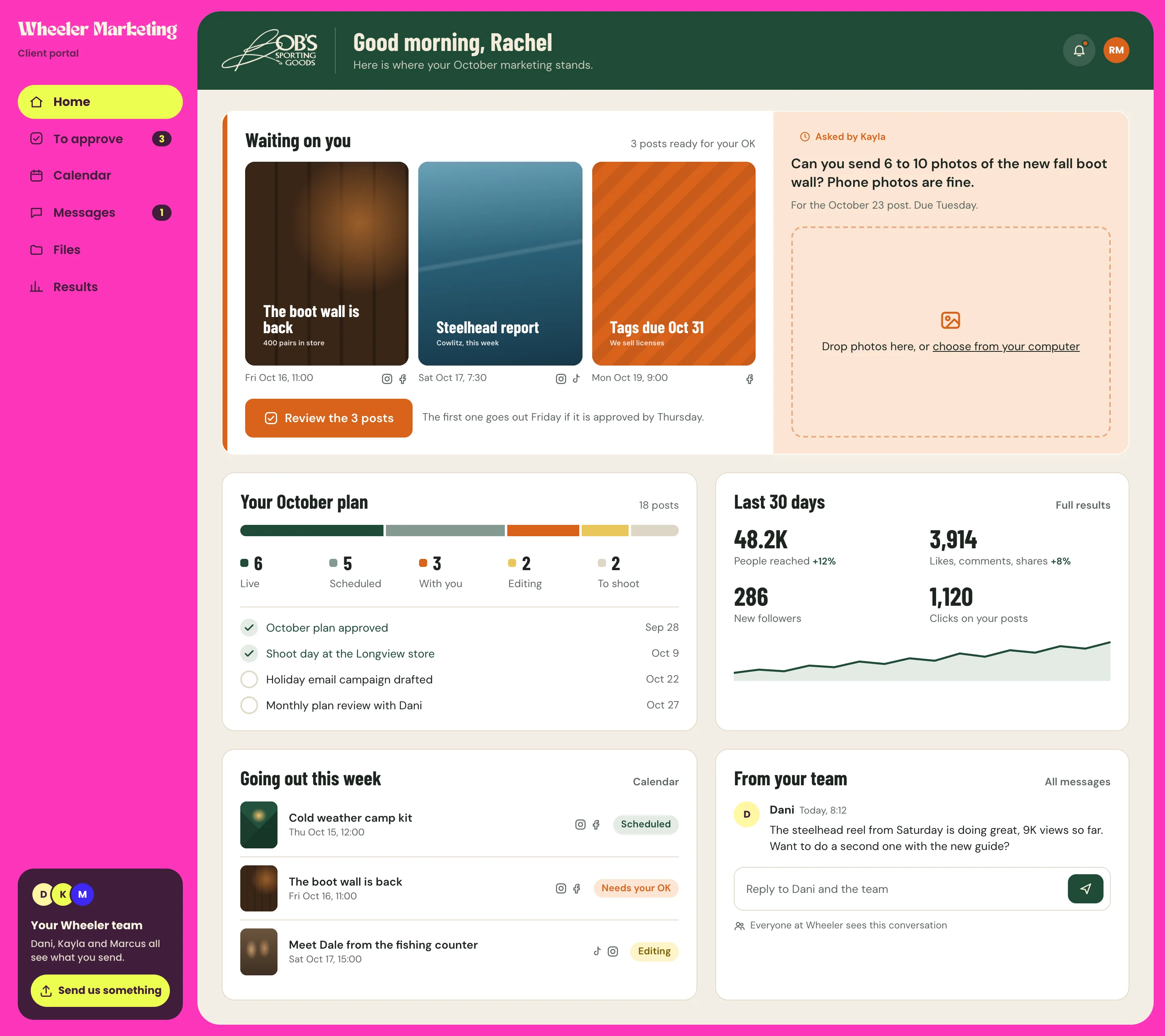
What someone at Bob's Sporting Goods would see when they sign in. The first thing on it is whatever is waiting on them.
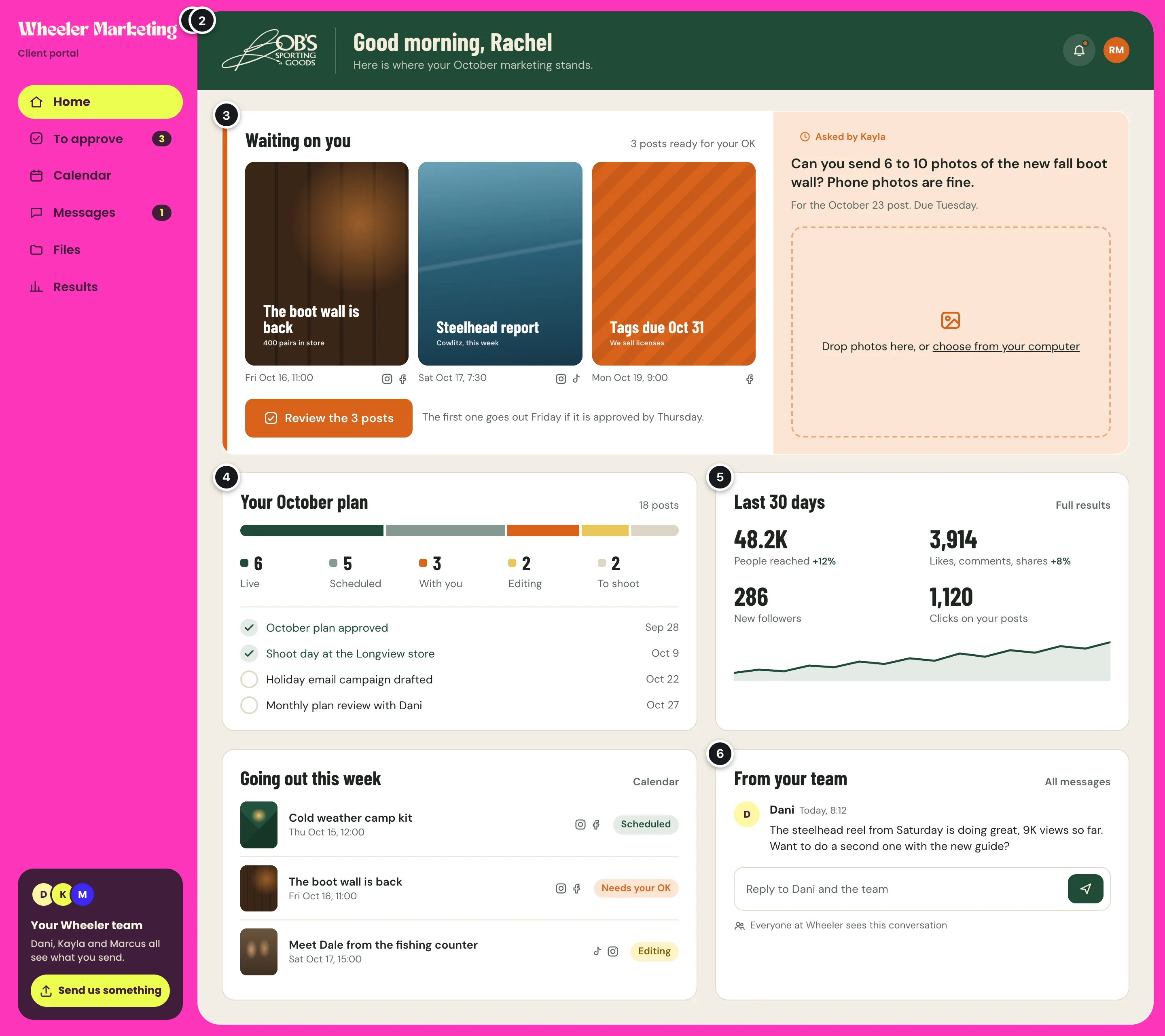
- 1Your frameYour pink, your wordmark, your menu. It is the same on every client's screen, so the portal always reads as Wheeler's.
- 2Their brandThe client's logo and colours fill the panel inside your frame.
- 3What is waiting on themPosts ready for their OK come from Vista Social. A request from your team, like photos of the new boot wall, comes from a task in ClickUp, and they can drop the photos straight in.
- 4Where the month standsThe month's posts counted by stage, and the milestones that matter to them, from the statuses and due dates in ClickUp.
- 5How it is goingReach, engagement, new followers, and clicks on their posts for the last 30 days, from Vista Social's reports.
- 6Your team's latest noteWith a reply box. Everyone at Wheeler sees the conversation, so nothing waits on one person.
Their brand inside yours
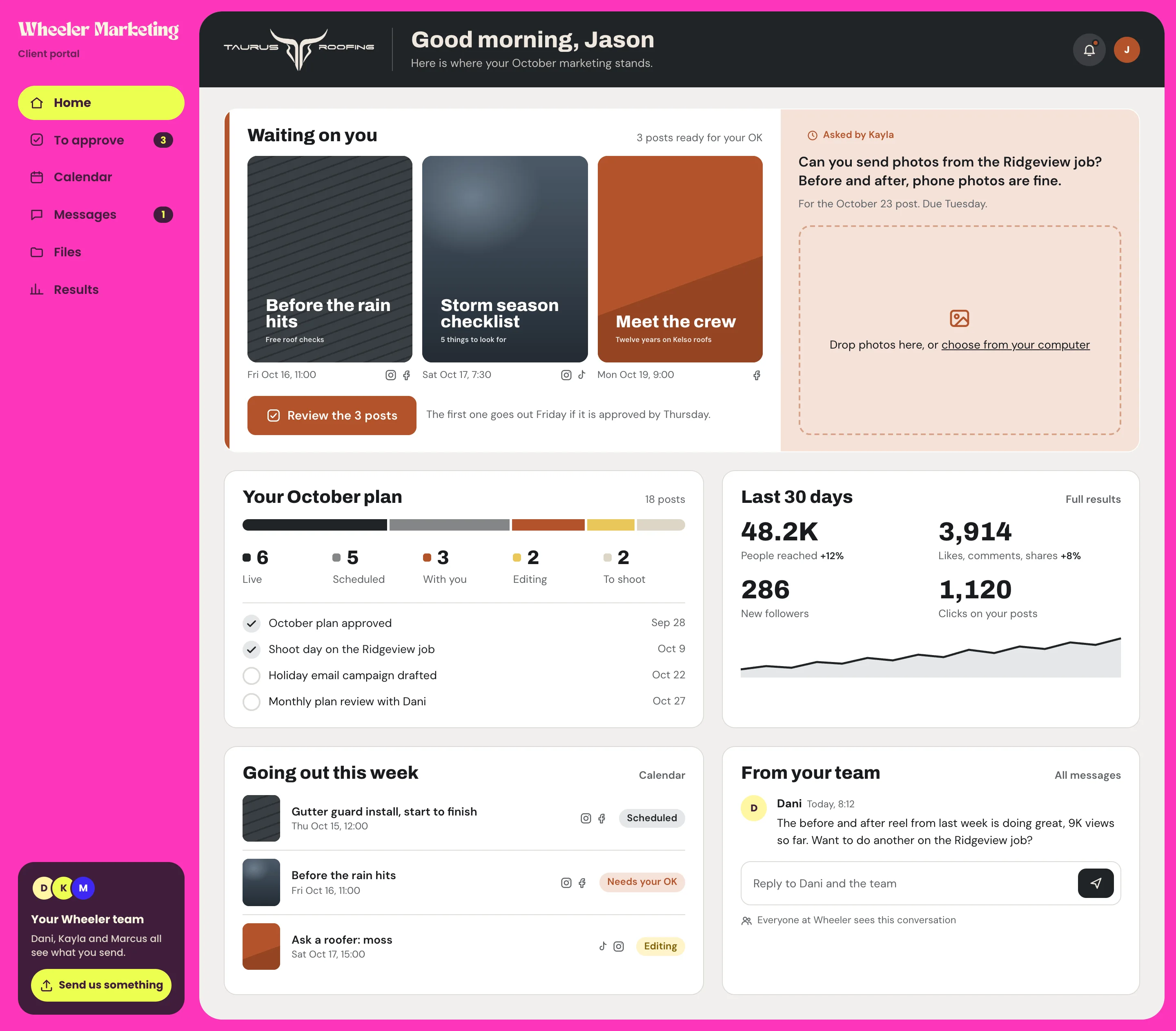
The same screen for Taurus Roofing. Your frame stays put. Only the logo, the colours, and the heading font change.
Your team sets each client up once, on your side of the portal.
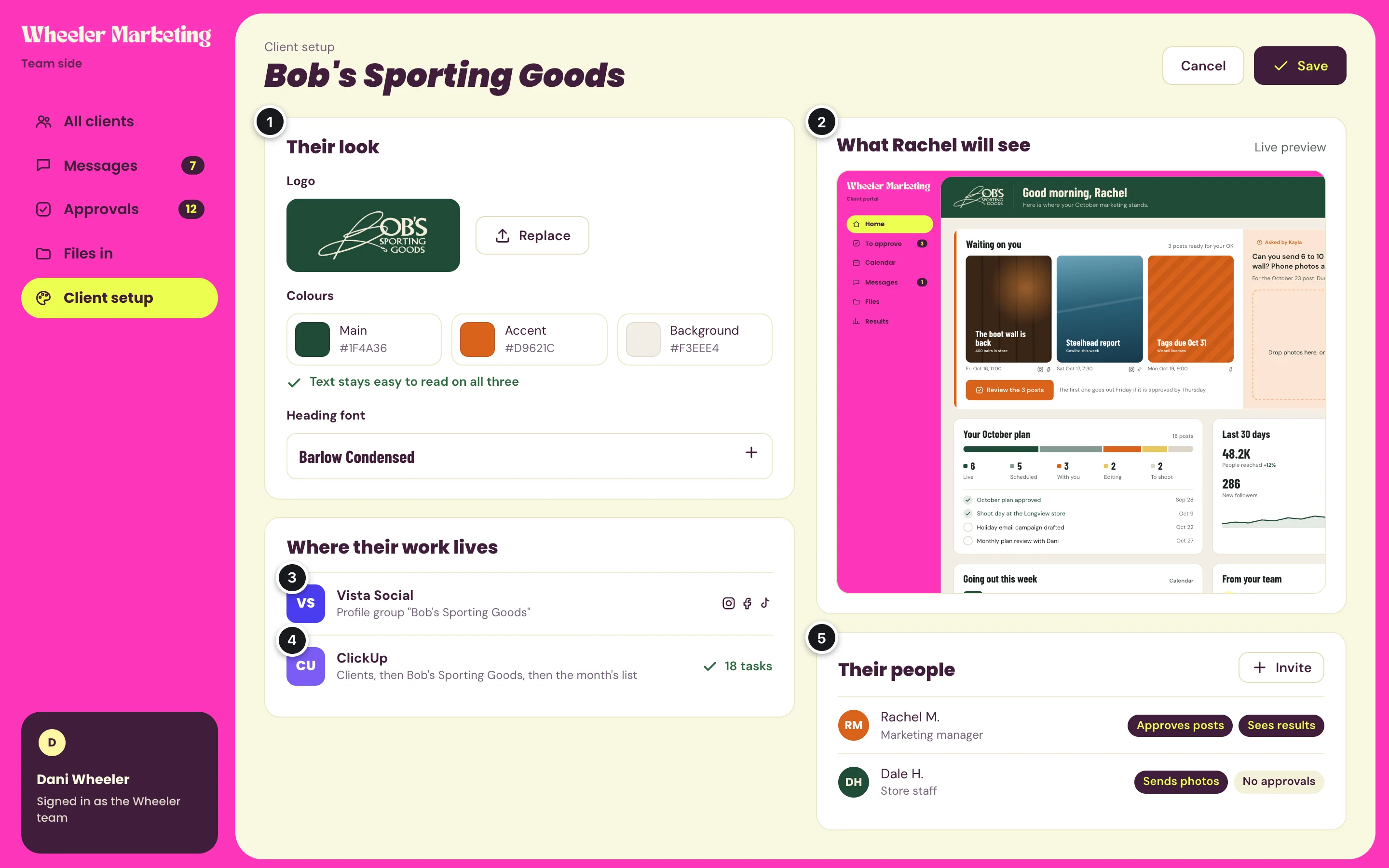
- 1Their lookA logo, three colours, and a heading font. The portal checks that text stays easy to read on the colours chosen.
- 2A live previewWhat the client will see, before you save.
- 3Their Vista Social profilesWhich profile group in Vista Social is theirs, so only their posts and results show.
- 4Their ClickUp workWhere their tasks live in ClickUp. This depends on how your workspace is laid out today, which is one of the questions below.
- 5Their peopleWho at the client can sign in, and what each may do. Someone at the store might send photos without being able to approve posts.
Approving posts
Posts your team sends for approval in Vista Social show up here, one batch at a time. A yes or a change request goes back to Vista Social and to your team.
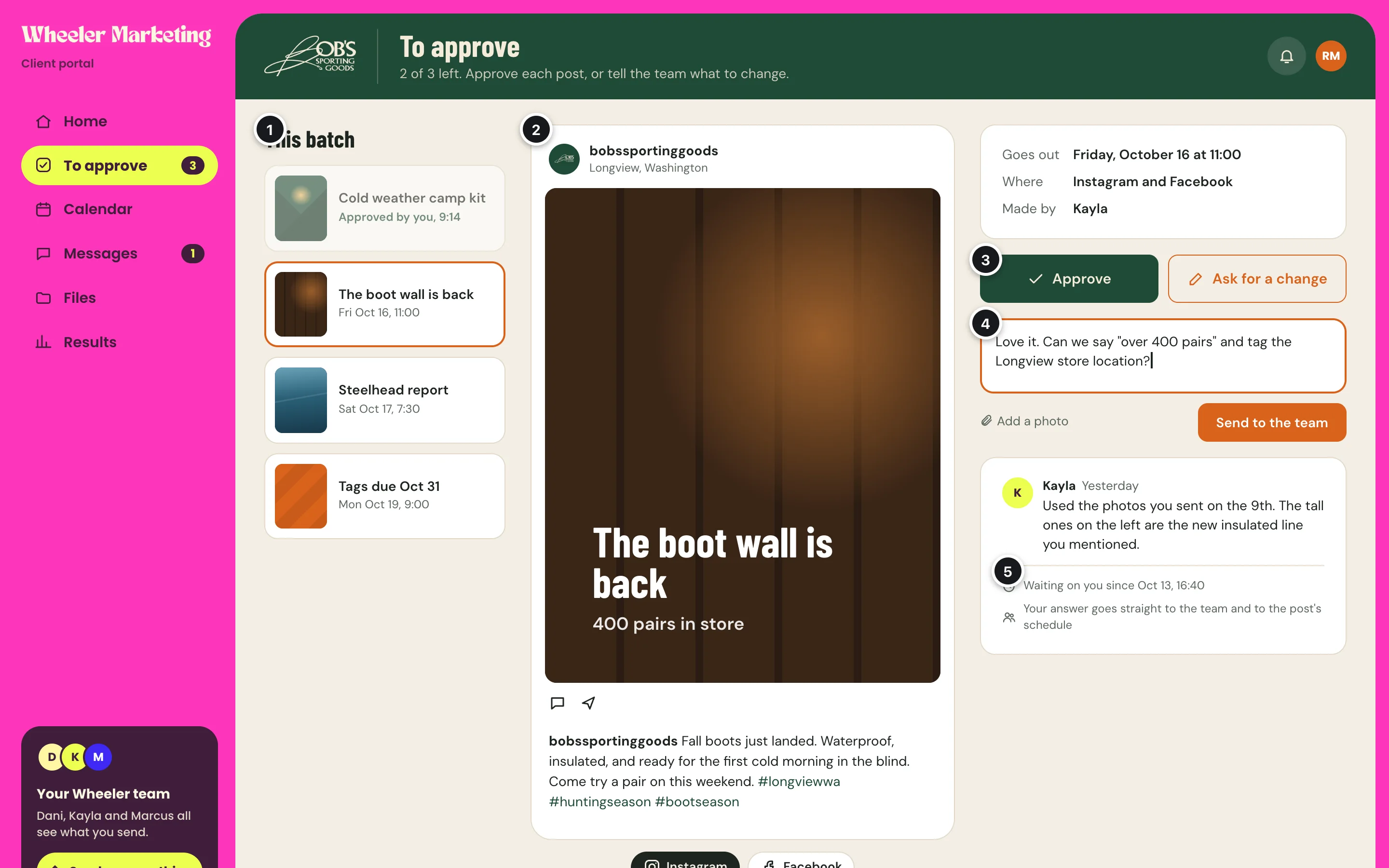
- 1The batchEvery post waiting on them, and the ones they have already approved.
- 2The post as it will lookPicture, caption, and tags, for each network it goes to.
- 3Approve, or ask for a changeOne tap either way.
- 4A change requestGoes to your team as a message, with a photo if they have a better one.
- 5How long it has waitedAnd what happens to their answer.
Vista Social can already let a client approve from a shared calendar link, without signing in. What this adds is that the approval sits beside everything else for that client, and the portal knows which of their people said yes. Inside Vista Social, an approval made through the portal is recorded under the one Vista Social account the portal signs in with, with the client's name in the approval note. The portal keeps its own record of who approved, and when.
The calendar
Everything going out this month, coloured by where it stands.
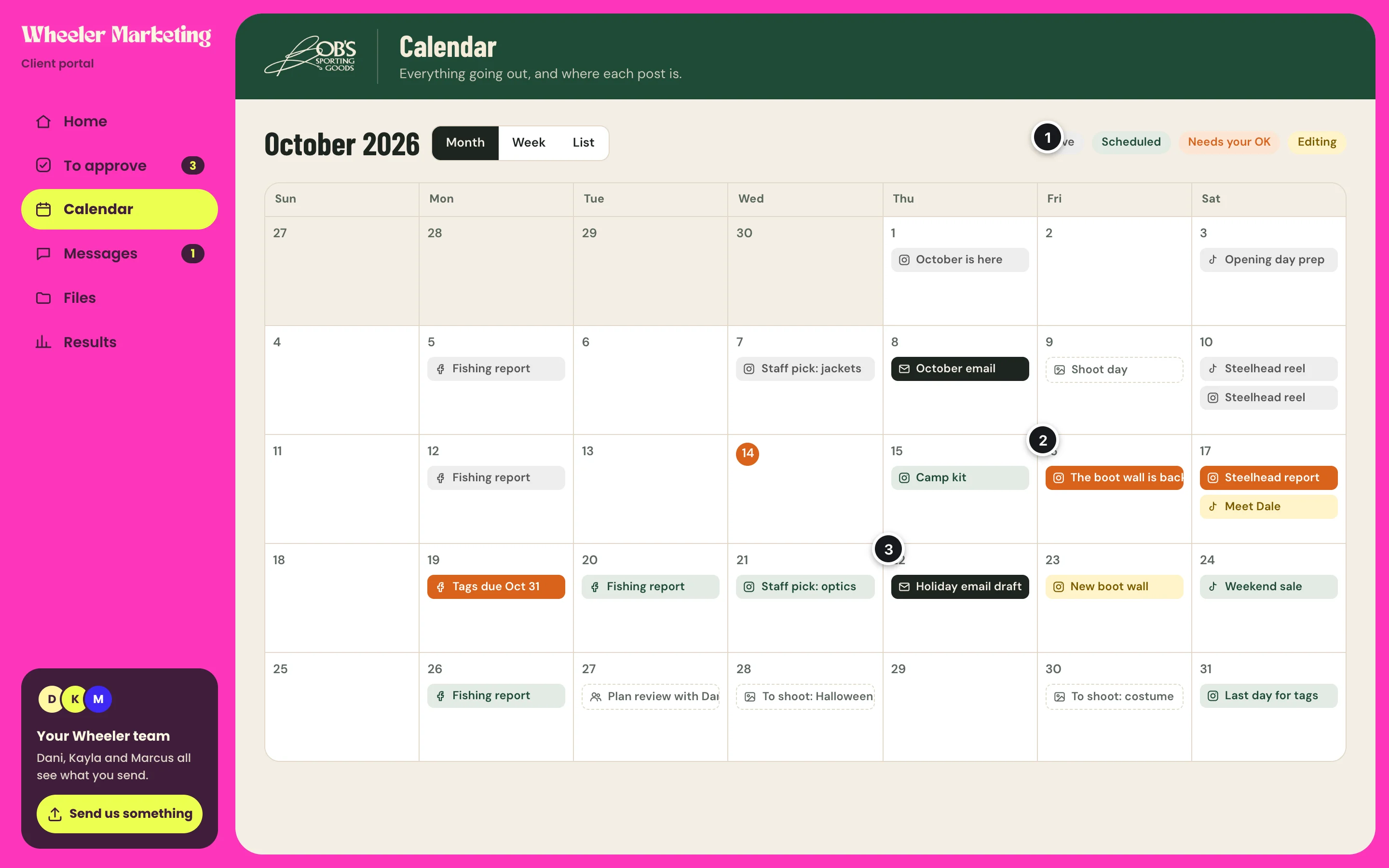
- 1Colour by stageLive, scheduled, needs your OK, and editing.
- 2What needs themA post waiting on their OK stands out from the rest.
- 3More than postsEmail campaigns, shoot days, and the monthly plan review on the same calendar. Whether email belongs here depends on where your email work lives, which is a question below.
Talking to your team
Conversations are kept by topic, so a photo request and a question about the holiday email do not get tangled in one long thread.
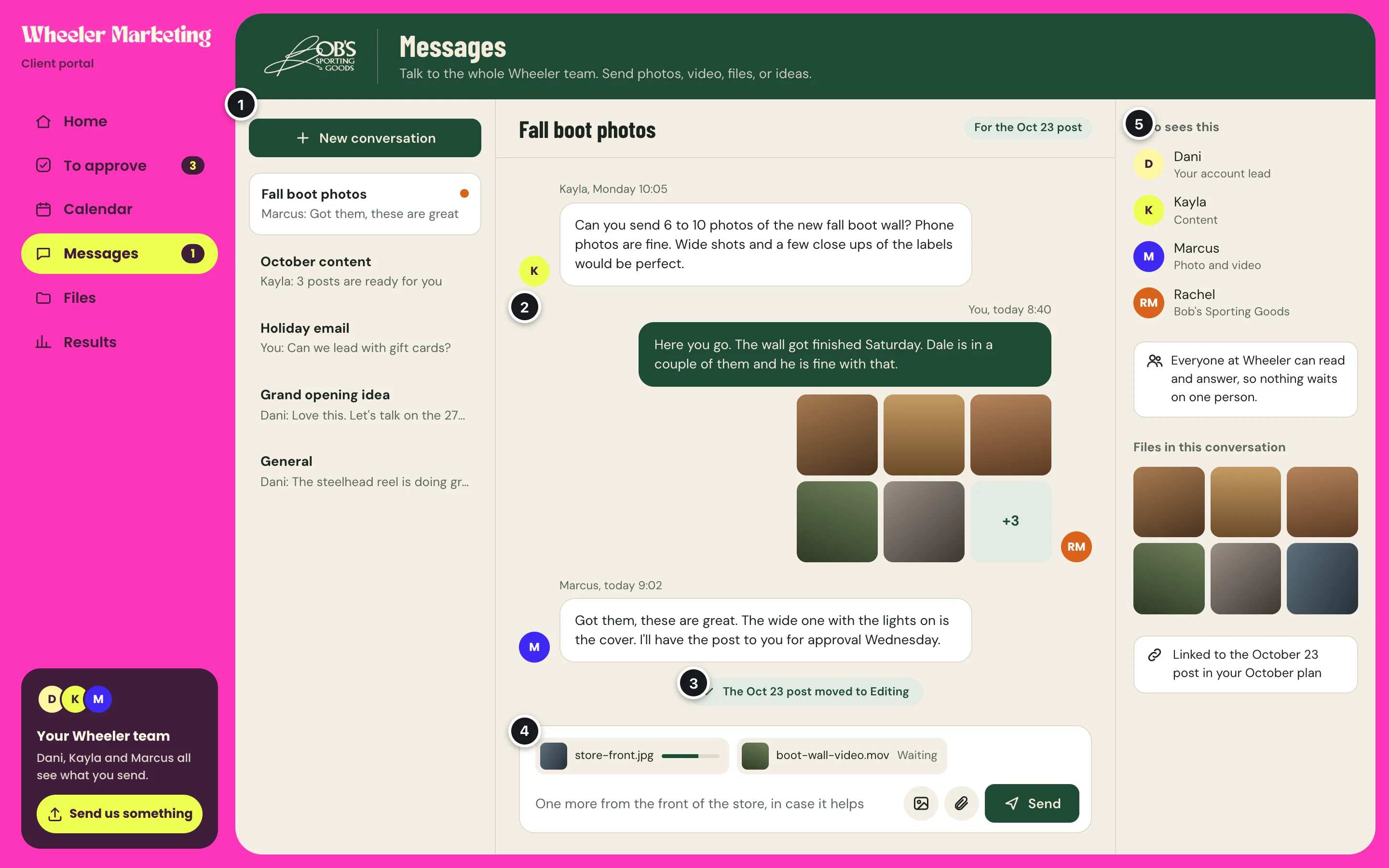
- 1By topicEach conversation has a name. Your team can start one too.
- 2Photos and videoSent right in the conversation, from a computer or a phone's camera roll.
- 3Progress, as it happensWhen the post these photos are for moves along in ClickUp, the conversation says so.
- 4Big filesUpload in the background while they keep typing.
- 5Who sees itYour whole team and that client's people. Nobody else.
Where your team answers
This is the biggest open question about messages. There are two ways it could work.
- Your team answers in the portal. Each message is also saved as a comment on the matching ClickUp task, so the history is in both places.
- Your team stays in ClickUp. A client's message arrives as a comment on a task, and a reply typed there shows up for the client. ClickUp tells other programs about new task comments straight away, so this works, with one rule to agree on: which comments the client sees, such as replies in their thread only, so your team's own notes on a task stay internal. ClickUp's chat is a different matter: it can be read and written from outside, but it does not announce new messages, and ClickUp still calls that part experimental.
Your team's side
Your team signs into the same portal and sees every client at once, in your colours throughout.
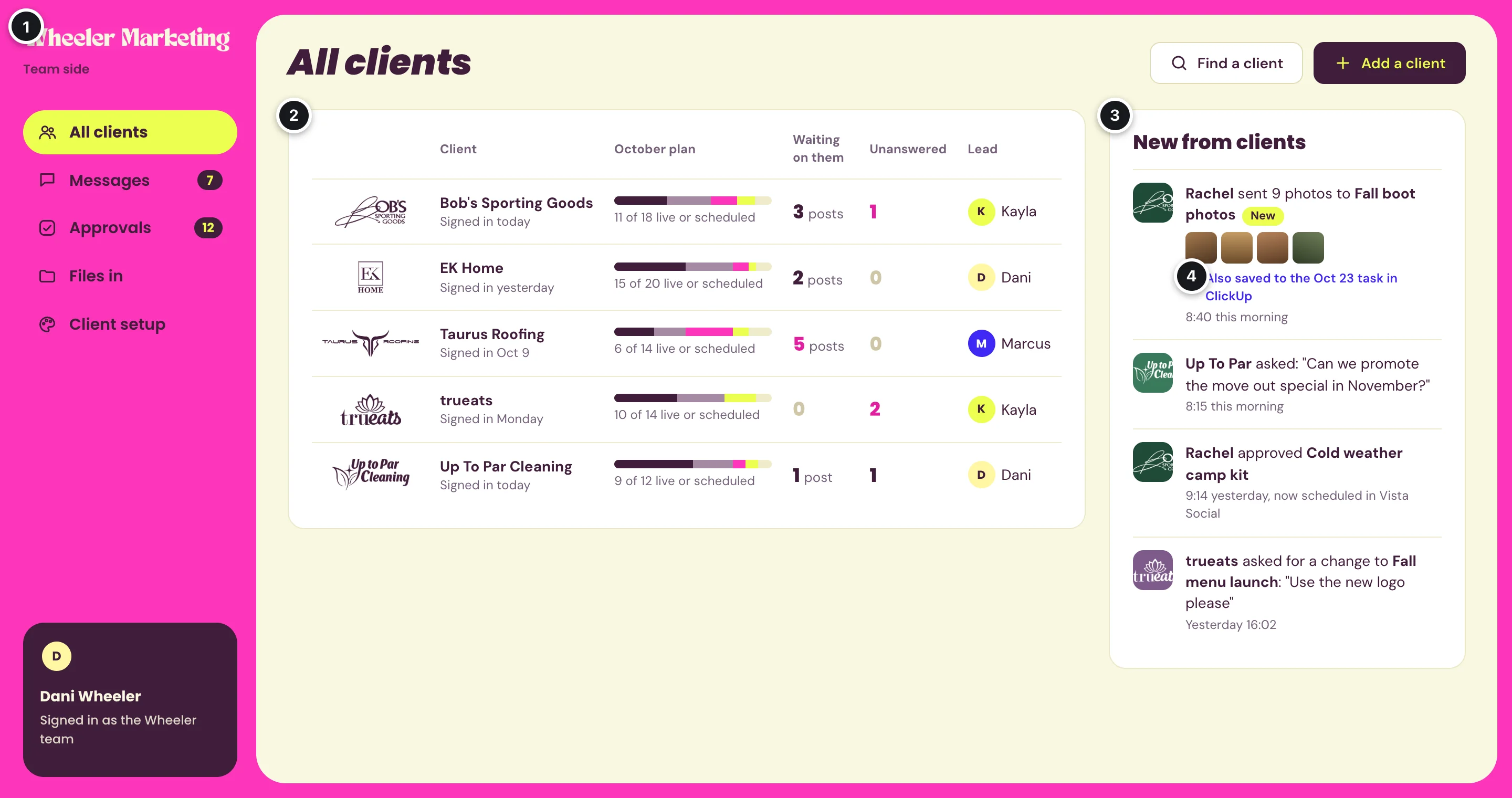
- 1Your side of the portalMessages and approvals for every client, files clients sent, and client setup.
- 2Every client at a glanceHow far along the month is, how many posts are waiting on the client, and whose message has not had an answer.
- 3New from clientsPhotos, questions, approvals, and change requests, newest first.
- 4Nothing moved by handPhotos a client sends are saved to the matching ClickUp task too, so nobody has to download and re-upload them.
On a phone
The first version is a web app that works well on a phone and can be added to the home screen, where it opens and sends notifications like any other app. iPhones and Android phones both allow this, with no app store in between.
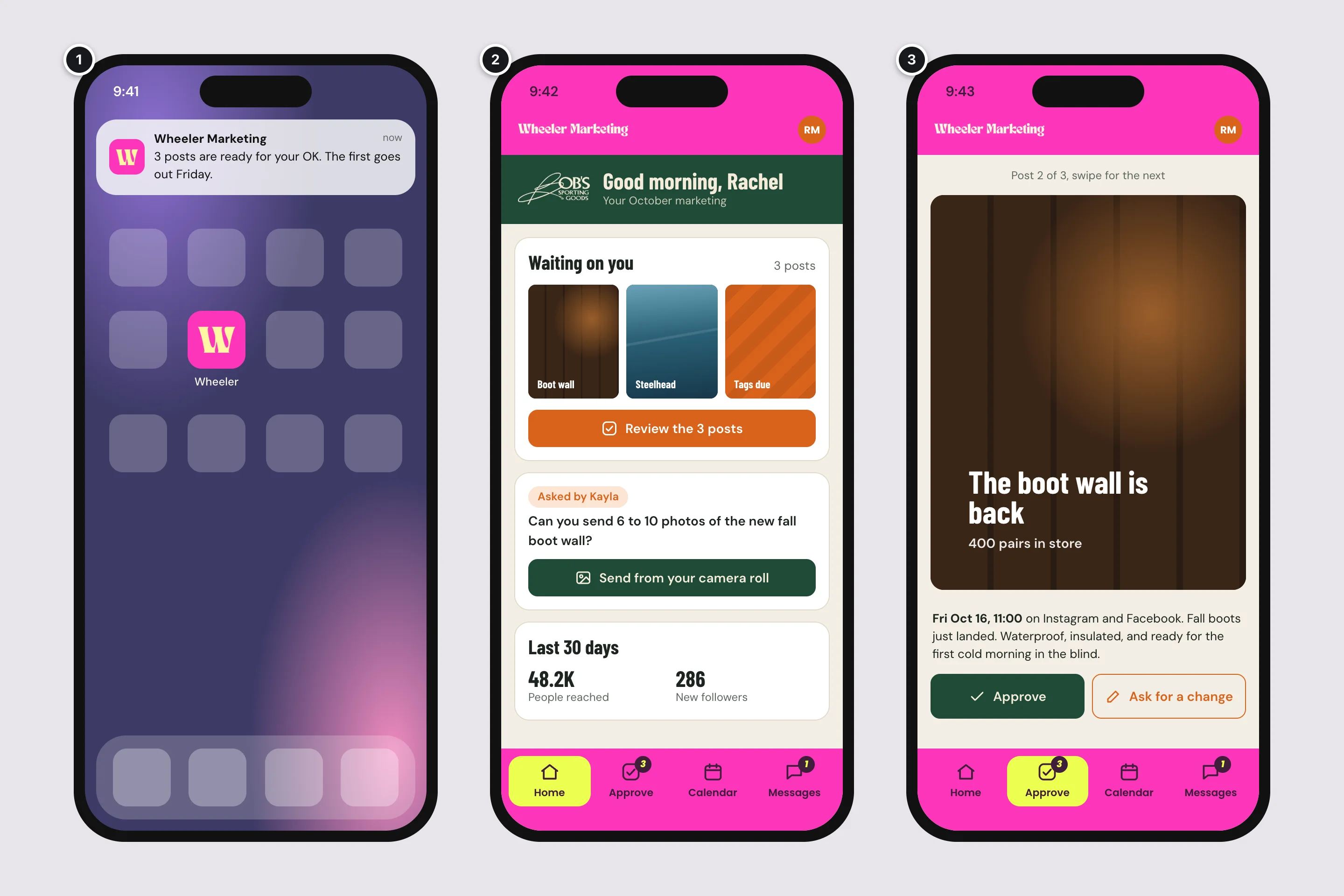
- 1On the home screenYour W as the icon, and a notification when something needs them.
- 2The same home, smallerYour frame becomes the top strip and the tabs. Their brand stays inside.
- 3Approving with one thumbSwipe through the batch, approve or ask for a change.
Versions in the App Store and Google Play come later, as their own phase: the same screens packaged for the stores. That adds store review, developer accounts in your company's name, and updates to keep up with as the phones change. Doing the web app first means your clients use it on their phones from day one, and we learn what they actually use before paying for the stores.
Where the information comes from
The portal does not replace Vista Social or ClickUp. Your team keeps working in both, and the portal shows each client their part.
Vista Social
- Posts in every stage, with picture, caption, time, and networks
- Approvals, both ways
- Results: reach, engagement, followers, and clicks on posts
Vista Social includes this access with its Enterprise plan, and offers it to other plans as an add on through their account team. Its price is not published. It does not announce changes, so the portal checks every few minutes.
The portal
- Who can sign in, and what each person may do
- Each client's look
- Conversations and the files sent in them
- Its own record of who approved what
Your frame outside, their brand inside.
ClickUp
- The month's tasks, their statuses, and due dates
- Requests your team assigns to the client
- Comments and files, both ways
ClickUp announces changes to tasks as they happen, so these show up right away. What the portal writes to ClickUp appears under one ClickUp account of its own, with the client's name in the text.
The one thing neither tool knows
ClickUp does not know which Vista Social post a task is for, and Vista Social does not know which task a post came from. The plan on the client's home screen counts posts from shooting all the way to live, so the portal has to join the two. Either your team keeps each task's status moving in ClickUp until the post is live, or each task carries the link to its post in Vista Social. Both work. Which one fits depends on how your team works today, so it is in the questions below.
Could you buy this instead?
Part of it, yes, and some of it you already pay for.
What Vista Social and ClickUp already do
- Vista Social can send a client a calendar link where they approve posts without signing in, can share report links and email reports, and on its Scale plan can put your brand and your own address on all of that.
- ClickUp can share a list as a read only link, and can add clients as guests. Guests need a ClickUp account and see ClickUp's own screens, and past a set number ClickUp charges for them like members.
Used together, that is two or three different links per client, in two different looks, with nowhere to talk to your team.
Client portals for agencies
Products like Assembly (it used to be Copilot), SuiteDash, ManyRequests, and Moxo give you a branded place for clients to sign in, message you, and share files, for a monthly fee that runs from about twenty dollars to several hundred.
None that I found reads Vista Social except through a connector service like Zapier. In most of them ClickUp appears only as a view embedded in a page. And none puts your brand around the outside with each client's brand inside.
So if what matters most is a branded place for messages and files, a bought portal gets you much of the way. If what matters is one screen per client that brings their posts, their approvals, their plan, and their results together, in their colours inside yours, that is the part that has to be built.
Questions for you
Beside each question is the guess the pictures were drawn on. The first four change the size of this the most.
The four that shape it most
-
When a client asks "where are we?", what should the answer look like?A month of posts moving through stages, a list of projects, a campaign, or something else.I assumed a monthly plan, with each post moving from to shoot, to editing, to with you, to scheduled, to live.
-
How is ClickUp laid out today?One space, folder, or list per client? A list per month? Does each post have its own task, and does its status keep moving once the post is in Vista Social? Which tasks should a client never see?I assumed a folder per client and a list per month, one task per post with the link to its post in Vista Social, and your internal tasks marked with a tag that keeps them out of sight.
-
How do clients approve posts today?I assumed they approve through Vista Social now, and the portal takes that over.
-
Where should your team answer clients: in the portal, or without leaving ClickUp?I assumed in the portal, with every message also saved to ClickUp.
What clients see
-
Which numbers matter to your clients?Do you send monthly reports today, and what do you make them with?I assumed reach, engagement, followers, and clicks from Vista Social, beside a link to your monthly report.
-
Should email marketing and paid ads show up too, and what runs them?I assumed email campaigns appear on the calendar, and ads are left out of the first version.
Messages and files
-
When a client sends something, who should hear about it, and how?Email, a text, a ClickUp notification? How quickly do you aim to answer?I assumed the client's lead gets a notification, and everyone on the team can see it.
-
What do clients send you, how big is it, and where does it live today?Phone photos, raw video, logos, documents. Google Drive, Dropbox, ClickUp?I assumed mostly phone photos and short video, kept in the portal and copied to the matching ClickUp task.
People
-
How many clients would use it, and how many people at each?Do some need less access, like store staff who send photos but do not approve?I assumed one or two people per client who approve, plus staff who only send photos.
-
Should everyone on your team see every client, or only their own?I assumed everyone sees everything, as you described.
Brand and phone
-
How far should a client's brand go, and where should the portal live?Logo and colours, or their fonts too? An address of yours, like portal.wheelermarketingagency.com?I assumed a logo, three colours, and a heading font, at an address of yours.
-
Does it matter to your clients that the app is in the App Store, or is an icon on their home screen enough to start?I assumed the home screen first, and the stores later.
The business side
-
Is this for the clients you have, or also something you show to win new ones? Would you charge for it?I assumed it is for current clients, as part of what they already pay you.
-
Is there a date that matters?A new client starting, the new year, a slow month for your team.I assumed none yet.
-
Whose name should the accounts it runs on be in?I assumed your company's.
What happens next
- You ask your Vista Social account team what their API add on costs, and whether your plan can have it or it takes their Enterprise plan. Every version of this needs it, and they answer their own customers.
- We go through the questions together, ideally with ClickUp and Vista Social open, so I can see how a client's month is laid out today.
- I write a detailed plan for the first version, the web app, and price it from that plan.
- The App Store and Google Play versions get their own plan and price when you are ready for them.
Nothing here is fixed. If a part is not what you pictured, tell me and we change it. Call or text me at (360) 513-5450.